

Single Fund Transfers
This guide walks you through initiating single payouts using the Fund Transfer API.
The Fund Transfer API is designed for high-velocity, same-currency payouts. By leveraging local banking rails such as NIP in Nigeria, ACH in the United States, and Faster Payments in the United Kingdom, this endpoint allows you to move funds from your Leatherback wallets to external beneficiaries with near-instant settlement.
Unlike SendR (Cross - Country Payments), Single Fund Transfers are “Like-to-Like,” meaning the source and destination currencies are identical, eliminating foreign exchange complexity.
When to Use This API
Choosing the correct endpoint is critical for accounting integrity and user experience.
| Use This API When... | Use SendR When... |
|---|---|
| Eg. Sending USD from a USD Wallet | Eg. Sending NGN from a USD Wallet |
| Paying a vendor in their local currency | Performing international currency conversion |
| Speed and domestic settlement are the priority | FX rate locking is required |
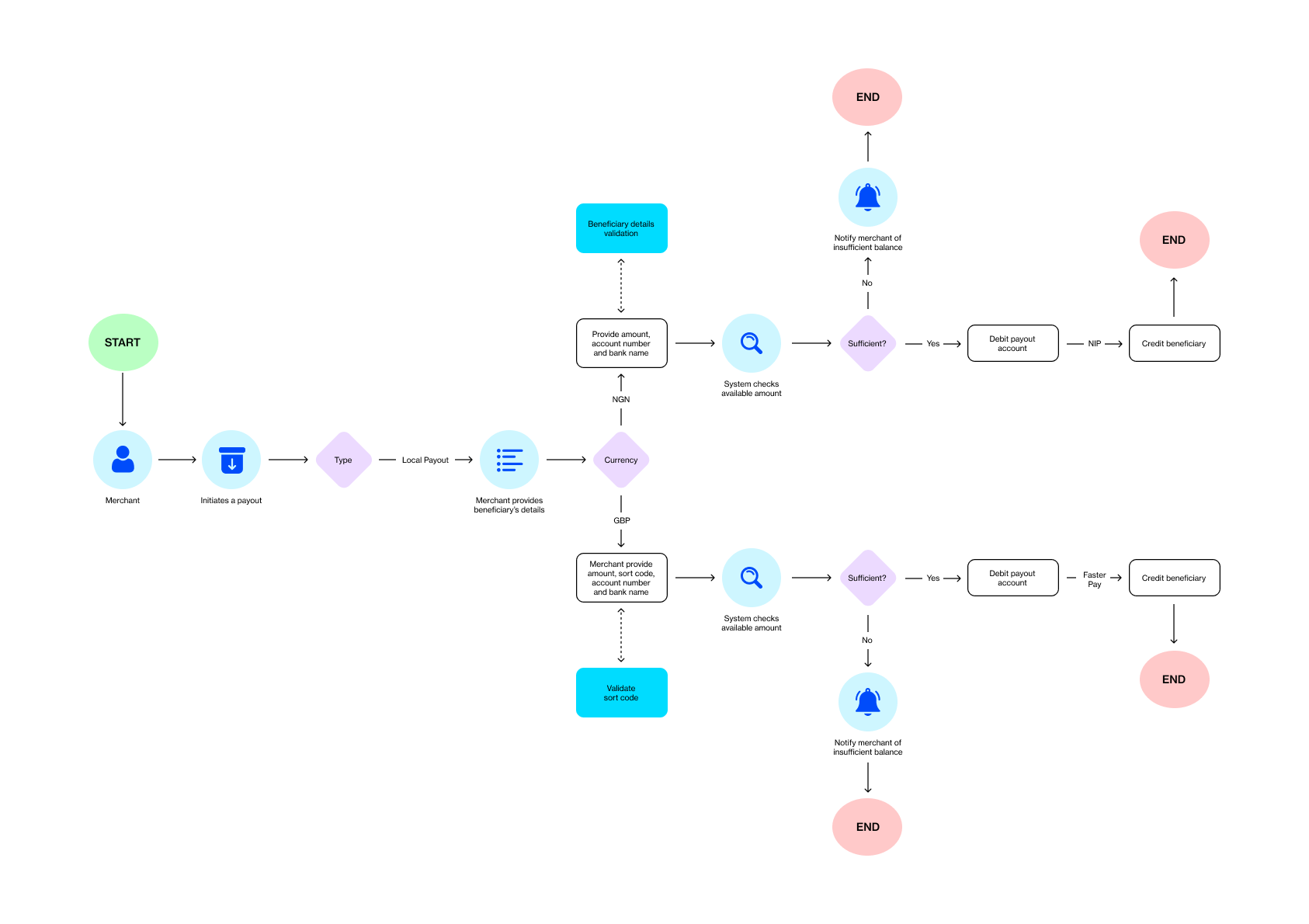
Key Architectural Components
Every Single Fund Transfer requires four primary data points to pass validation:
-
tenantReference
Your unique, idempotent string used to prevent duplicate transactions. -
amount
The gross value of the transfer in its minor unit (for example, cents for USD, kobo for NGN). -
currencyCode
The ISO 4217 currency code. This must match the source wallet currency. -
beneficiaryDetails
Destination routing information such as account number, bank code, routing number, or sort code depending on jurisdiction.
The Implementation Flow
Executing a same-currency transfer on Leatherback is an orchestrated process that moves from requirement gathering to idempotent execution and finally to event-driven reconciliation.
Dynamic Requirement Discovery
In a global ecosystem, routing fields are not static. A transfer to a Nigerian bank requires a BankCode, while a transfer within the United Kingdom requires a SortCode.
Before rendering your transfer UI, call the Payment Methods endpoint to retrieve the mandatory fields for your specific currencyCode.
{
 "BeneficiaryCurrencyCode": "USD",
  "BeneficiaryBankCountryCode": "GBR",
  "CurrencyCode": "NGN",
  "Amount": "8001",
    }
{
"value": [
{
"name": "BankCode",
"currency": "NGN",
"requireFileUpload": false,
"paymentDestination": "Local",
"metaData": {
"beneficiaryAccountNumber": "Text",
"beneficiaryAccountName": "Text"
}
}
],
"isSuccess": true,
"error": "",
"message": "",
"responseCode": null,
"type": null,
"title": null,
"status": 200,
"detail": null,
"instance": null,
"extensions": {}
}Initiate a Single Fund Transfer
To send money to a customer you need to use the Fund Transfer Endpoint. This is a POST request that triggers a series of real-time events: authentication, balance verification, compliance screening, and finally, dispatching funds.
curl --request POST \
     --url https://laas.leatherback.co/payout/Disbursement/Payout/FundTransfer \
     --header 'accept: application/json' \
     --header 'content-type: application/json' \
     --data '{
  "currencyCode": "USD",
  "beneficiaryAccountName": "Jide Onakoya",
  "beneficiaryAccountNumber": "",
  "amount": "300",
  "narration": "checking again",
  "paymentMethodType": "AbaRouting",
  "paymentMethodValue": "202686",
  "tenantReference": "{{$randomInt}}",
  "beneficiaryAddress": "8916 Jamaica Ave, Woodhaven, NY 11421, United States",
//   "nameEnquiryRef": null,
//   "beneficiaryKYCLevel": null,
//   "beneficiaryBankVerificationNumber": null,
//   "intermidiaryBankRoutingNumber": null,
  "beneficiaryFirstName": "Jide",
  "beneficiaryLastName": "Onakoya",
  "beneficiaryCity": "New York",
  "beneficiaryState": "New York",
  "beneficiaryZIP": "21228",
  "beneficiaryCountryIso": "US"
}'
{
"value": {
"reference": "TFGXSADPPO",
"tenantReference": "Bd47-f1594517-b628-475b-80f5-933728514268"
},
"isSuccess": true,
"error": "",
"message": "transfer is being processed",
"responseCode": null,
"type": null,
"title": null,
"status": 202,
"detail": null,
"instance": null,
"extensions": {}
}{
"failures": [
"'Narration' must not be empty."
],
"isSuccess": false,
"error": null,
"message": null,
"responseCode": null,
"type": "ValidationException",
"title": "A Validation error occured on the supplied payload.",
"status": 400,
"detail": "One or More Validation Failures Have Occurred.",
"instance": null,
"extensions": {
"traceId": "00-5a468e4e778fae961b82943d712c6629-25bf6f428e334f1a-00"
}
}
{
    "isSuccess": false,
    "error": "9977598776's balance (89970.00) is not sufficient to process a transaction of amount (1000000020)",
    "message": "9977598776's balance (89970.00) is not sufficient to process a transaction of amount (1000000020)",
    "responseCode": null,
    "type": null,
    "title": null,
    "status": 400,
    "detail": null,
    "instance": null,
    "extensions": {}
}
Idempotent Initiation
Once you have collected the required beneficiary metadata, you are ready to initiate the transfer.
The Critical Role of Idempotency
Every request must include a tenantReference. This value is your safeguard against duplicate debits.
If a network timeout occurs:
- Retry the request using the exact same
tenantReference. - Leatherback’s gateway will detect the duplicate reference.
- The system will either return the existing transaction or complete the original request.
Never generate a new reference when retrying a previously submitted transfer.
Reconciliation and Webhooks
Single Fund Transfers are processed asynchronously. When you receive a 200 OK or 202 Accepted response, the transaction enters a Pending state.
Do not rely on continuous polling of the status endpoint. At scale, polling is inefficient and may result in rate limiting.
Instead, implement a webhook listener to receive event notifications for terminal states.
Terminal States
| State | Event Type | Description |
|---|---|---|
| Completed | payout.success | The beneficiary bank has confirmed credit. |
| Failed | payout.failed | The transfer was rejected, such as due to invalid account details. Funds are automatically restored to your wallet. |
| Reversed | payout.reversed | The transfer was initially successful but later returned by the receiving bank. |
Updated 6 months ago